


Tableau Public is one of the largest collections of data visualisation knowledge anywhere. Creators have published millions of workbooks covering every technique imaginable, from charts like small multiples, plum pudding, and all manner of custom charts to neat calculation hacks that save time and make amazing interactivity. Some of those workbooks go on to win awards, others help their creators secure a job offer, others introduce new techniques for working with Tableau.
The problem is that all of that knowledge is locked inside Tableau workbooks, and getting it out is harder than it should be:
You need to know what chart or technique you’re looking for
After downloading a workbook you need to understand how they did it
Then you need to apply the method to your data
It can be a steep learning curve for new users and very time consuming for even seasoned Tableau users, potentially taking hours to unravel several complex calculations and level of detail (LOD) expressions.
Tableau Public MCP: Turn Workbooks Into Tutorials
What used to take an hour of clicking through worksheets now takes a single prompt.
With Tableau Public MCP, you can turn a published workbook on Tableau Public into a tutorial. The MCP server comes with a set of tools that will allow an AI model to search, download, and reverse-engineer workbooks to produce guides on how it was made, giving everyone on the team quick answers to their challenges building Tableau dashboards.
This tool benefits:
New Tableau Users: they can quickly learn from tailored community examples
Experienced Users: save time reverse-engineering complex workbooks
Team leads: can build training materials based on public workbooks
And the code is free to use, downloadable from my GitHub account, complete with a setup guide. https://github.com/wjsutton/tableau-public-mcp
What’s MCP?
MCP (Model Context Protocol) is a set of tools you can provide to an AI model to perform tasks consistently on your behalf. For Tableau Public those tasks might be searching for content, or downloading a workbook, or examining a Tableau workbook. These tools are designed to be compatible with the majority of modern LLMs (ChatGPT, Claude, etc.) and can be run locally for additional security.
Use Case 1: Understand how Tableau Workbooks were made
In Claude (or an AI provider of your choice) with the MCP tools configured I can now prompt content on Tableau Public. Below I can share a link to a public workbook and learn more about how it was created.
How was this viz made? https://public.tableau.com/app/profile/gbolahan.adebayo/viz/MarketingCampaignPerformanceDashboard_17164464702070/InsightsOverview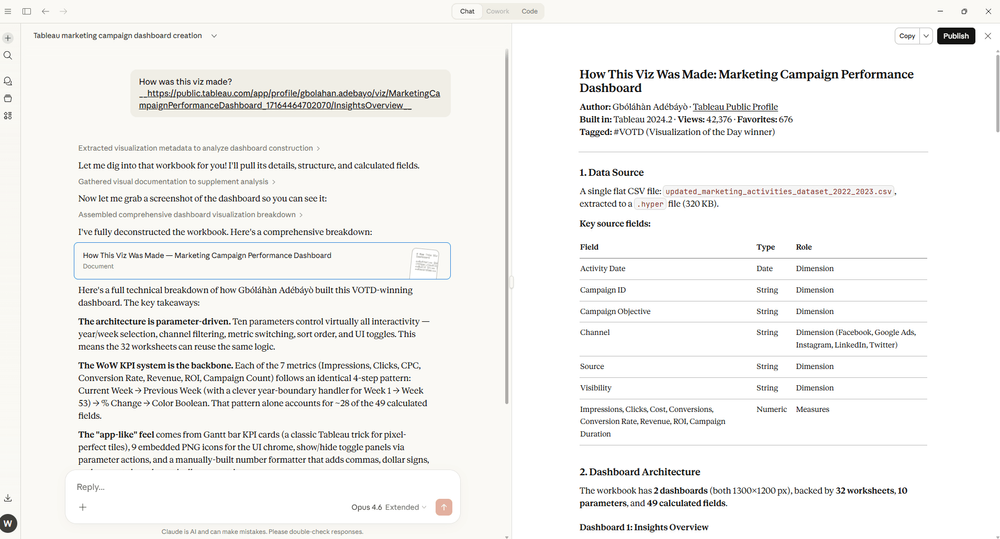
You should expect to see a guide containing details of the data source, worksheets, calculations, chart types and key techniques. This does rely on the workbook being downloadable from Tableau Public to analyse the data source and workbook contents. If you are going to use this technique to recreate visualisations please make sure you credit the original author's work.
You can expand on this prompt, and even bring in your own data to turn a public dashboard into a template with the prompt below.
Can you analyse this Tableau Public dashboard: [viz-url] and provide:
* How it was built (worksheet structure, calculations)
* Required data structure and fields
* Key calculations and LOD expressions used
* Any domain-specific nuances (e.g., [domain-area] data considerations)
* Common pitfalls to avoid

Then create a step-by-step guide for building a similar dashboard using [data-source].

Optional specifications:
* Focus on these metrics: [specific-metrics]
* Include adaptations for [industry/use-case]
* Provide sample calculated field formulas
Going further you can use the same technique to document your own dashboards on Tableau Public. Or you could use the MCP to document content you have on your Tableau Server/Cloud environment, for this you would need to give the LLM a tool to download workbooks from your Tableau environment and then run the Tableau Public tools to unpack the workbook and examine the XML inside.
Use Case 2: How do I build [Chart-Type] with my data?
Understanding a single workbook is useful but we can take this further. We have tools to search across Tableau Public, allowing the MCP to find and download multiple workbooks. We can then add in our own data and build a guide to take us from raw data to a Tableau visualisation or dashboard.
Using examples from Tableau Public can you help me build a [chart-type] with this dataset.This example I demoed at the Tableau Public User Group, taking on a Back to Viz Basics (B2VB) challenge to build a dot plot with the provided dataset. This technique can help users build non-default charts in Tableau with assistance based on ready made examples.
Here, I am passing a CSV file, but you can use other MCP servers to share the data with Claude. For example, I could use Tableau MCP to query a published datasource, or query a dbt model, or a Snowflake table. Push it further with this prompt template
How would I build a [chart-type] with [dataset-description] in Tableau?

Please:
* Search Tableau Public for [chart-type] examples showing [data-pattern-type]
* Explain the required data structure for my [time-period] data
* Provide all necessary calculated fields with explanations
* Include table calculation setup instructions
* Show variations: [chart-variations]

My data details:
* Date range: [date-range]
* Metrics: [metric-list]
* Grouping: [grouping-dimension]
Use Case 3: Help me train my team on [technique] in Tableau
Tableau experts will share various techniques as Tableau Public dashboards, be they tutorials, conference presentations, or their favourite hacks. Using the MCP tools you can find and weave these workbooks into a training plan to help upskill a team.
help me build a training session about LOD calculations using tableau public workbooks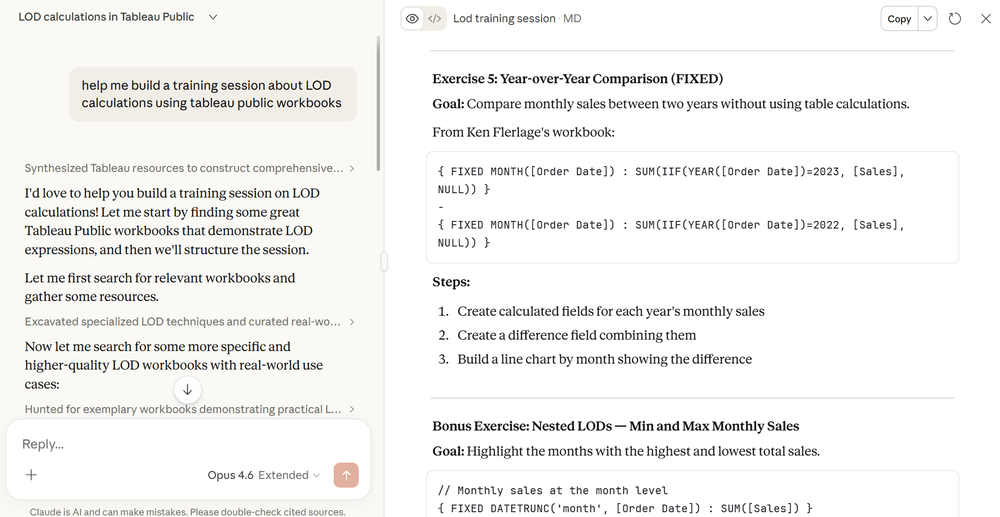
The result here walks you through the FIXED, INCLUDE, and EXCLUDE calculations, with explained examples. From there, it dives into workbook examples from Tableau Public. You'll find many examples using the Superstore dataset. Using the earlier use cases you can adapt these techniques for your internal data sources.
Push it further with this prompt template
Build me a training session on [technique] in Tableau.

Please:
* Search Tableau Public for the best [technique] workbooks, prioritising high view counts
* Download and extract the real calculations from the top workbooks
* Explain the core syntax, variations, and when to use each
* Include order of operations and filter behaviour gotchas
* Provide 5 hands-on exercises using Sample Superstore

Session details:
* Audience level: [beginner / intermediate / advanced]
* Duration: [duration]
* Focus areas: [focus-areas]
Quick Questions
Do I need a Tableau Public account? No, and no authentication is needed. The server uses Tableau Public's publicly available APIs, which is a big plus for setup compared to most MCP integrations.
What happens if a workbook isn’t downloadable? The Tableau Public MCP can still read workbook metadata and structure from the API, however it won’t be able to see the data structure or calculated fields. Typically if you are searching for techniques the workbook will be skipped and the next workbook will be downloaded and analysed.
Can I use this with ChatGPT, Claude, or other models? The MCP server works with any MCP-compatible client. Claude Desktop I find is the easiest way to get started but you could integrate this to your own preferred AI model, be it one of the major providers or a locally hosted model suitable for MCP tool calling.
Can I use my work data with this? The MCP server itself only reads from Tableau Public. For your own data, you can run it locally or through your workplace LLM provider. If you're working with sensitive data, use a service to create a mock version of your dataset before sharing it. Using Tableau MCP you can bring in your company’s data without having to export to CSV.
Can I use this alongside Tableau MCP? Yes. The Tableau Public MCP Server complements the official Tableau MCP. Use Tableau MCP for your Server or Cloud environment, and the Tableau Public MCP Server for learning from the community's published work. This would help take the knowledge of Tableau Public and apply to your company’s data.
How does this work? The MCP tools depend on the Tableau Public APIs, which I started documenting about 6 years ago. The tools will call the APIs on your behalf to retrieve data, workbooks and images from Tableau Public. These are all public API calls with no authentication required. https://github.com/wjsutton/tableau_public_api
Getting Started
Setup takes around 10 minutes via Claude Desktop. The video setup guide walks through the process step by step.
The easiest way to start is to:
Have Node.js installed on your machine
Install an AI client, this could be Claude Desktop, VSCode or LMStudio for local model use
Configure your AI client with the MCP tools built from the source package using the config below.
{
  "mcpServers": {
    "tableau-public": {
      "command": "npx",
      "args": ["-y", "@wjsutton/tableau-public-mcp-server@latest"]
    }
  }
}
Alternatively you can set up the tools locally by downloading the code and building the MCP server.
Resources
Tableau Public MCP Server on GitHub - source code, installation instructions, and full documentation
Examples and Prompt Templates - practical use cases including portfolio generation, dashboard guides, and gallery builders
Video Setup Guide - step-by-step walkthrough for Claude Desktop and VS Code
Tableau Public TUG Feb 2026 - presentation of Tableau Public MCP with demos, starts at 45 minutes