

This is a case study describing one potential cause and resolution for the “Unable to verify the server’s HTTPS certificate” error when running TSM commands (even when using the --trust-admin-controller-cert flag in your commands) combined with your TSM web interface being inaccessible with your usual <hostname>:8850 / <IP_address>:8850 / <public_URL>:8850 address, displaying a 502 Bad Gateway error instead.

Background:
A customer reported that the titular scenario occurred after an unclean shutdown of their primary node in a two-node, 2025.1.10 Tableau Server running on Linux.
Primary Symptoms:
“Unable to verify the server’s HTTPS certificate” error when running TSM commands (even when using the --trust-admin-controller-cert flag in your commands).
Running “tsm status -v” returns “Could not connect to server. Make sure that Tableau Server is running and try again.”.
TSM web interface being inaccessible with your usual <hostname>:8850 / <IP_address>:8850 / <public_URL>:8850 address, instead displaying a 502 Bad Gateway error.
Despite this, the Tableau Server frontend is still accessible and seemingly functional for end users.
Secondary Symptoms:
Checking the status of the tabadmincontroller_0 service with “systemctl status tabadmincontroller_0” comes back with “Unit tabadmincontroller_0.service could not be found.”

Navigating to /var/opt/tableau/tableau_server/data/tabsvc/services/tabadmincontroller_0.<serverversion> and running the status.sh script showed a currentDeploymentState of NONE with a “Connection refused” message and a processStatus of DOWN.
"currentDeploymentState" : "NONE",
  "details" : {
    "message" : "Connect to <<machineName>:8219 [<machineName>/>IP_ADDRESS>] failed: Connection refused"
  },
  "name" : "tabadmincontroller_0",
  "processStatus" : "DOWN",
  "timestampUtc" : 1769770429239,
  "version" : "20251.25.1121.1650"
}
In the tabadmincontroller logs you may find the following error:
Caused by: java.io.FileNotFoundException:
/var/opt/tableau/tableau_server/data/tabsvc/config/tabadmincontroller_0.20251.25.1121.1650/zookeeper.truststore.p12 (Permission denied)
Attempting to review the current SSL certificate validity dates with the following command results in a “unable to load certificate” error.
openssl s_client -connect localhost:8850 | openssl x509 -noout -dates
Nothing appears to be listening on port 8850 after running “sudo netstat -anp | grep 8850”.

Additional Investigative Steps:
No change in behaviour after a tsm stop/tsm start.
No change in behaviour after running a tsm stop → stop-administrative-services script → start-administrative-services script.
No custom TSM SSL implemented:
Servicestate.json file appears to be normal.
Underlying Cause:
The ownership of some files within the Tableau Server file system had been changed and the unclean shutdown had caused the tabadmincontroller port to get reassigned to something other than 8850.
Resolution Summary:
Restore ownership of relevant files to tableau:tableau.
Reset the tabadmincontroller port to 8850.
Full Resolution Steps:
As mentioned above, there were two parts to this issue!
1. Resolving the “permissions denied” error in the tabadmincontroller logs.
This error was indicative of the ownership of some Tableau Server files possibly have changed, mostly likely due to running commands as “root” instead of the “tableau” user at some point. All folders in the Tableau Server file structure (on Linux) should be owned by the “tableau” user.
In this instance, we resolved the specific “zookeeper.truststore.p12 (Permission denied)” error by giving that file’s ownership back to the tableau user and group (whilst in the directory for the file).
chown tableau:tableau zookeeper.client.keystore.p12
Afterwards you should see the file is no longer root:root but is now tableau:tableau.
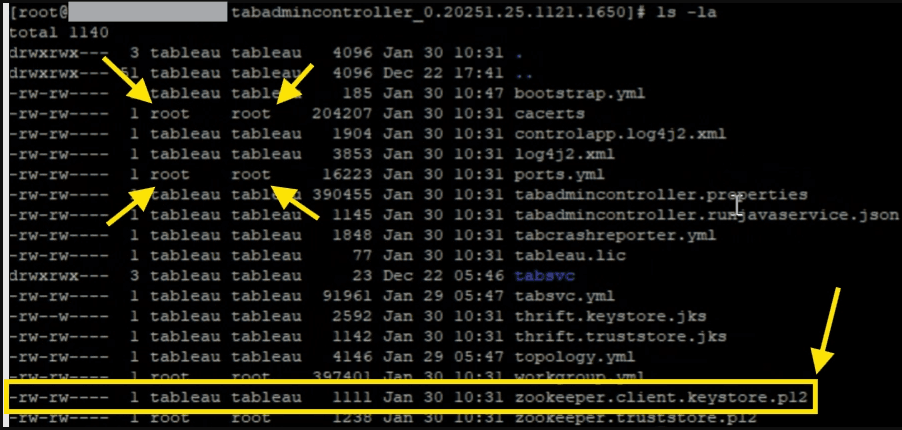
However, as seen above, some files are still owned by root. A more robust solution is to run the following to give ownership of all files in the Tableau Server directory back to tableau:tableau to ensure there’s no further permission issues.
Stop the Tableau Server.
tsm stop
Correct all the file and folder permissions.
sudo chown -R tableau:tableau /var/opt/tableau/tableau_server/data/tabsvc
Start the Tableau Server/
tsm start
This is done at the data/tabsvc level but could be done higher up.
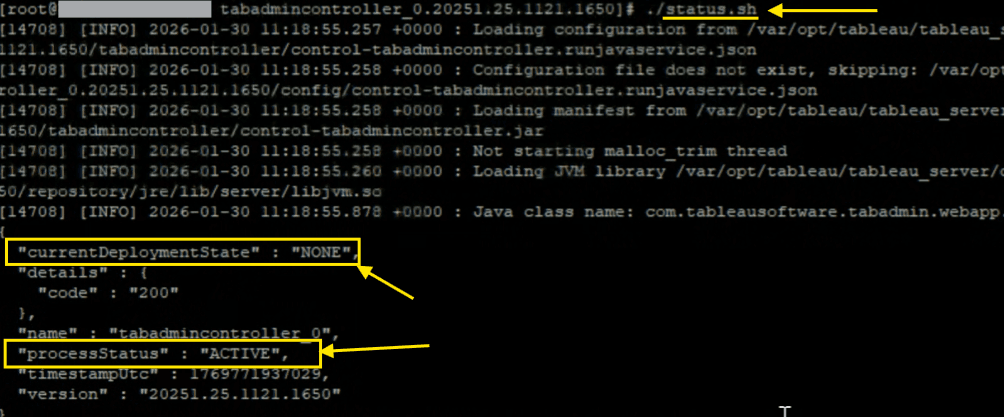
After fixing the permissions, checking status.sh on the tabadmincontroller service should hopefully now show a processStatus of ACTIVE and the currentDeploymentState no long shows an error.
2. Restoring TSM access.
Earlier, in the ‘Secondary Symptoms’ section we observed that the tabadmincontroller service didn’t appear to be listening on port 8850 as expected. Your goal now is to verify what port is then is listening on! There’s two good ways of doing this:
Review the ports.yml or workgroup.yml file in \Tableau\Tableau Server\data\tabsvc\config and look for worker0.tabadmincontroller.port.
Use the following commands to get the PID of the tabadmincontroller process and then use that PID to find the associated port:
ps -ef | grep tabadmincontroller
ss -lntp | grep <PID>
Both of these should reveal the current port! In our case it was 8219. To validate this:
In the web browser, try accessing TSM with :<yourPort> instead of 8850. E.g. localhost:8219, .
Via the command line, use the -s parameter to specify the TSM address with the new port, e.g. tsm status -s https://<hostname>:8219/ -u username
If these work you’ve identified the issue! You can actually also see this issue hinted at in the original error message we were getting when running status.sh on the tabadmincontroller service before we fixed the file ownership issue.
You can now reset the port back to 8850 with the command below, before restarting the Tableau Server to apply the change (replacing 8219 & hostname as appropriate).
tsm topology set-ports -s https://<hostname>:8219/ -u tsmadmin --node-name node1 --port-name tabadmincontroller --port-value 8850