

What’s a Tableau Extract?
An extract in Tableau is a special type of database, optimised for use by Tableau. Its super fast, portable and a great way to handle large data sets. But how do you create one, and what creative ways are there to make use of them?
Firstly, how do you create and extract?
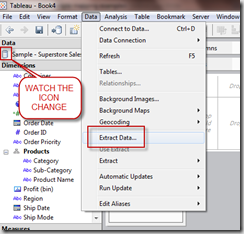
This bit is simple, assuming you are using Tableau Desktop. After you have connected to your data, go to the DATA menu and choose EXTRACT DATA – then accept the defaults on the dialog box (although more on this later). Tableau will as where you want to save the extract – choose any location to save the file, although Tableau will probably direct you towards ‘My Tableau Repository | Datasources’ which is just fine too!
Now wait for the extract to be created, how long you’ll wait depends on the database technology you’re using, network speed, data volumes that sort of thing.
You’ll know it’s done when the data source icon changes – it will have another database icon behind it, presumably representing a 'copy’, which is exactly what an extract is.
So, that’s how to create on (well the basics anyway) – but WHY would you want to?
Extract reason #1 – Performance
Extracts are FAST. They are awesomely fast with a million rows, and they only slow down to ‘amazingly fast’ with 100 Million rows.
But extracts are not just for big data sets. Once your familiar with the Tableau interface, even a 1 second delay when using the interface can be annoying – you get used to the speed and responsiveness quickly. I recommend using extracts for any data set which is anything other than super-responsive.
For example:
If you have 50,000 rows in Excel – its likely to be annoyingly slow. An extract solves this immediately.
If you’re using a Remote SQL server, create an extract over lunch, and you’ll have instant response times when you get back.
Extract reason #2 – Offline analysis
Extracts are files that you store on your PC (file extension .tde). So of course you can take one with you on holiday. If you just can’t sit by the pool without dreaming about histograms and scatterplots, then extracts could be for you…
They work on planes too.
Extract reason #3 – Accessing additional functionality
Some database technologies have restrictions that stop Tableau communicating with them as they would like. The most common problem caused by this (in my experience) is the absence of COUNT DISTINCT when using Excel as a data source.
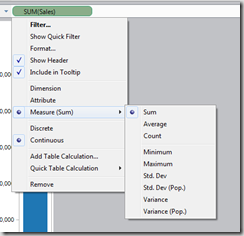
To see this in action, connect to an Excel source, and then drag a dimension out using the RIGHT MOUSE BUTTON. When you drop this, you’ll get to choose from the following options:
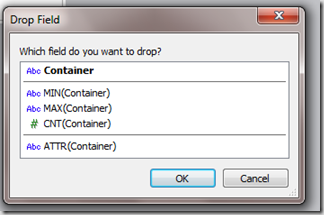
Which is no good for me!! I’m trying to get COUNT DISTINCT…
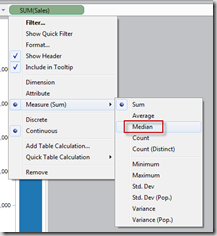
But, if I change to an extract…
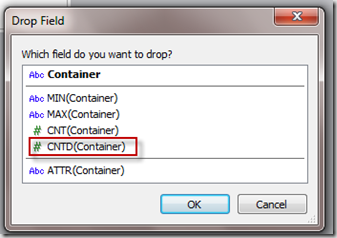
Now I get COUNT DISTINCT – which allows some really insightful visualisations to be built.
The same holds true if you are trying to get a MEDIAN value for a measure, this is not available from Excel, so you’ll need an extract.
FROM EXCEL FROM AN EXTRACT
Extract reason #4 – Creating packaged workbooks
Packaged workbooks are a fantastic bit of Tableau functionality, allowing you to created a distributable file which can be an interactive visualisation. This can be opened by users of the FREE Tableau Reader – which you can download here.
BUT – you can’t ‘package’ data which is held on remote servers, so you can’t package data from a SQL server, Oracle etc.
UNLESS you create an extract first. Then you’ll have no problems.
Extract reason #5 – Publishing to Tableau Public
You can’t use packaged workbooks without extract as described above, but neither can you use Tableau Public. If you want to publish data to the web, you’ll have to use an extract.
Extract reason #6 – Data security
Here’s a more subtle use case. Suppose you work at a hospital, and you are REALLY NOT ALLOWED to share patient level information – yet you want to create a packaged workbook with a data source which does contain this information. What do you do? Here’s where the extra functionality of the data extract dialog comes into play.
When you extract data, you’ll see this window. Notice the button at the bottom, this removes all the dimensions and measures which you have NOT used in ANY VIZ from the extract.
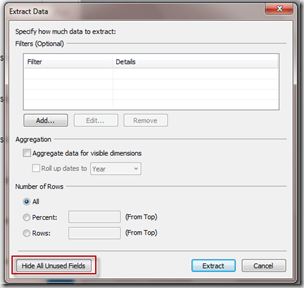
The extract you have then created can be packaged, safe in the knowledge that any fields you did not want to be visible are not even in the extract, so they can’t be accessed.
Using this same dialog, you can restrict the ROWS (rather than columns) which are included in your data set by using the filter section. Consider using a relative date filter for an extract which contains (say) the last 3 weeks of data).
Extract Reason #7 – Double aggregations
This is my personal favourite.
Suppose you have timesheet data which has one row per employee/day. You want to know the average hours recorded per MONTH.
To solve this one, you first need to aggregate the data by employee/month, and then produce a view which then averages the data by month (hence the double aggregation).
Extracts address this problem as they can be used to perform the first level of aggregation, providing a new data source over which to run the Average calculation.
This step is performed in the extract dialog window, by ‘Aggregating visible dimensions’ and then rolling up dates to month.
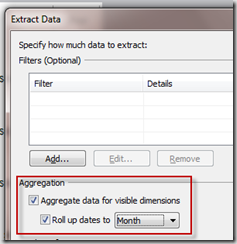
You can also use this feature to massively reduce the size of the extract file by '’Hiding’ dimensions in the data window before you take this step.
I’m sure there are many more reasons to use extracts – and that in the future we’ll see many more developments in this area from Tableau.
Please drop me a line if you have other uses you think should be on this list.